Review of Canon Multipass F30
by Gail Allinson (GailLA)
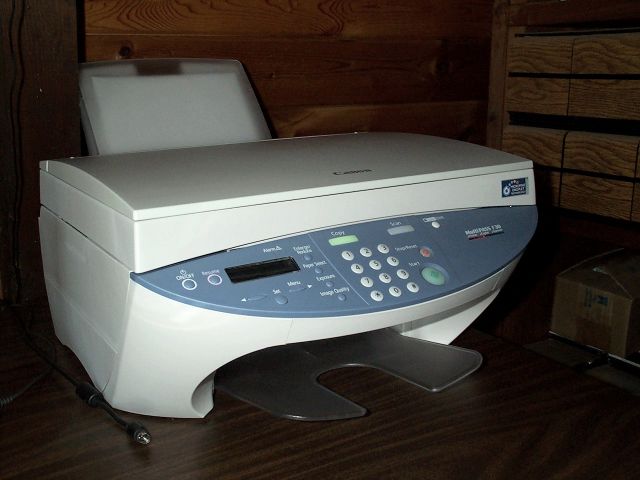
Review: Canon MultiPASS F30
by Gail Allinson (GailLA)
Street Price: $269 to $299
Multifunction: InkJet Printer, Flatbed Scanner, Copier
Similar Product: MultiPASS F50 (adds automatic sheet feeder for
scanner/copier, and PC fax)
Connections: Parallel IEEE 1284 (cable not included), USB (cable not
included), standard three prong PC power cord (included)
OS: Windows 95 (no USB), 98, ME, NT, 2000, XP
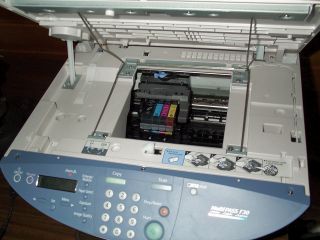
Ink: 4 ink tanks Black BCI-3eBK, Yellow BCI-3eY, Magenta BCI-3eM, Cyan
BCI-3eC
Consumer replaceable print head (covered by warranty)
OEM Ink Tanks Street Price: $11 to $13 ea
Aftermarket Ink Tanks Street Price: $5 to $7 ea
Paper: 100 sheet auto feed for plain paper (letter and legal size, it will
feed envelopes and other media including photo paper, t-shirt transfer, and
cardstock)
Software: 2 CDs with Printer Driver, Twain Scanner, WIA (option for Windows
XP only), Caere OmniPage Pro 9
Documentation: Printed and Online Manuals, Setup Poster*
This spring, my mission was to find a replacement for our laser copier/printer. Since the new SOHO paper-using device had to do at least
the copier and printer jobs as well as scan, I was limited to looking at
multifunction machines. Also, we did not want a fax machine of any sort. After researching on the Web, I finally recommended a Canon MultiPASS F30.
Please note that I'm not a Canon cheerleader, and I made the recommendation reluctantly. My last printer was a Canon (possibly the worst model they
ever made) and was not a good experience. Still, the positive F30 reviews and affordable ink prices were difficult to ignore. So we bought one F30
for the upstairs workstation in May. After great success with the F30 upstairs, I wanted one downstairs, too. I have had it on my desk for two
weeks as I write this review in early August.
The MultiPASS F30 has several strong points. The first is the relatively inexpensive ThinkTank(tm) ink system. Each color is individually
replaceable so you never throw out the unused colors just because one color
has run dry. The printhead is not replaced with the ink tank making this system very cost effective. The second strong point is that the F30 makes
beautiful color copies right out of the box. I put a brochure on the glass, pressed the button and was amazed at the how true to color and detailed the
copy was. The only color that was slightly off was the red. The red was a tiny bit yellowish on the copy, but still extremely close. Third, this
machine scans very true to color if the included twain driver is properly
configured for the monitor. This color tweaking is easily done using thescan preview and only needs to be done once. Fourth, the print driver allows
for a variety of media and custom paper settings. Next, the driver also includes a helpful "print advisor" wizard. For black and white printing
there is a convenient "grayscale" only checkbox. The driver does not provide for "odd, even" printing but does provide for collated and reverse
order printing. The driver also easily saves print setup profiles -- the
easiest and most flexible that I have ever used. Beyond that, this machine is fast and very quiet. I haven't tried to time it, but it seems at least
as fast as our laser printer was on black and white text jobs. Last, the
control panel on the front has very complete and understandable copy controls. This is important because this machine can be used as a
stand-alone copier.
There are also several downsides to this machine. First, it is a Windows only printer/scanner. Next, it can be shared on a network, but it is not
classified as a network printer. Further, it is large and heavy compared to
other machines in its class. Most annoyingly, the Canon software puts a toolbar and "My MultiPASS" folder on the desktop. The toolbar can be easily
turned off, but removing the "My MultiPASS" folder from the desktop requires a registry hack (at least in Windows ME).** Removing the desktop folder
breaks "My MultiPASS" on the toolbar, so if you use the toolbar, you'll probably want to keep the folder. The software also puts a printer monitor
icon in the Windows tray. This is required for the printer to communicate with the computer and causes no apparent problems, but I'd prefer its being
optional.
In conclusion, I've never been an "all-in-one" kind of person; but this machine has changed my mind. It does all of its jobs accurately, quickly,
quietly, and inexpensively. It does everything as well as, or better than,
the individually dedicated machines we have owned in the past. It may be built like a tank, but is is an attractive tank that rolls over the work
with ease.
*For specifications and more information see MultiPASS F30 support site at:
http://12.129.248.84/techsupport.php?p=mpf30
**First backup (export) and then delete this registry key to get "My
MultiPASS" off the desktop:
[HKEY_LOCAL_MACHINE\SOFTWARE\Microsoft\Windows\CurrentVersion\explorer\Deskt
op\NameSpace\{4B4604E0-8961-11D4-A0EC-009099164712}]
@="My MultiPASS"
@Copyright 2004 by Gail Allinson
@ Copyright 2002 - 2003 by On Computers and the Videotex Services Coalition.